
Alt text is not optional. Screen readers depend on it, search engines read it, and an image library full of blank alt attributes is an accessibility problem sitting quietly until an audit finds it. So it is a strange omission that the old Sitefinity Images module grid does not show the Alternate Text field at all, and gives you no native way to sort on it to find the images that are missing one.
You can add the column yourself. Open the Images grid, click Columns, and add a new DataColumnElement bound to the alt text field with a header label. The exact field name and settings are in the screenshot below.
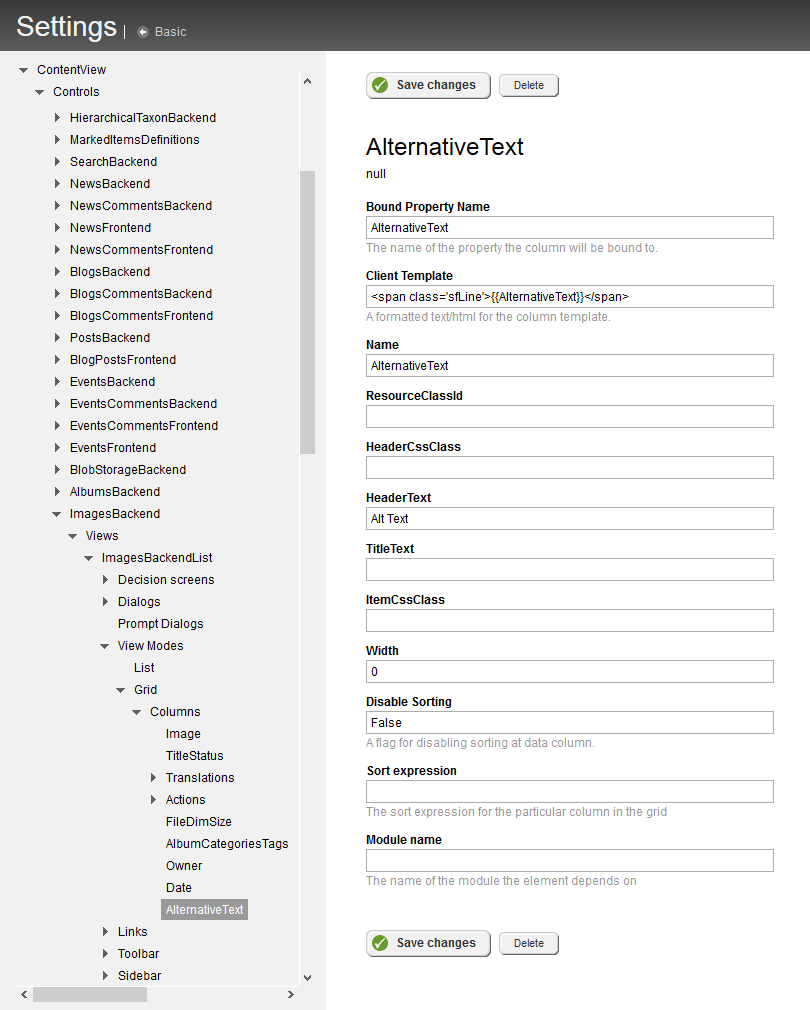
Once it is a real column you can sort by it, and every image with empty alt text floats to the top where you fix them in one pass instead of clicking into each one to check. That is the entire point. Nobody audits accessibility one item at a time, but anyone will skim a sorted list and clear the blanks off the top.
One caveat from a 2020 revisit. This applies to the old backend grid only. The newer AdminUI is a different stack and the column trick does not carry over to it. Plenty of long lived Sitefinity installs are still on the classic UI though, and on those it holds up fine.